
Overview Table: Offline Maps and Travel Apps
| Category | Purpose |
|---|---|
| Offline Maps | Navigation and location tracking without internet |
| Offline Navigation | Turn-by-turn directions using downloaded data |
| Offline Translation | Language assistance without network access |
| Offline Travel Guides | Destination information stored on device |
| Offline Communication | Messaging and calling without live internet |
| Offline Entertainment | Music, videos, and reading during travel |
| Offline Utilities | Currency conversion, notes, calculators |
| Data Storage | Documents and tickets available offline |
| Battery Efficiency | Reduced data usage conserves battery |
| Travel Reliability | Access to essential tools anywhere |
Introduction to Offline Travel Technology
Traveling without a reliable internet connection is still a reality in many parts of the world. Remote destinations, international roaming costs, poor network coverage, and flight or train journeys often leave travelers disconnected at crucial moments. In such situations, offline maps and apps that work without internet access become essential tools rather than optional conveniences.
Offline travel apps allow users to download maps, guides, documents, and utilities in advance so they can continue navigating, communicating, and managing daily needs without relying on mobile data or Wi-Fi. These tools are especially valuable for international travelers, backpackers, road trippers, hikers, and anyone exploring unfamiliar locations.
This article provides a complete explanation of offline maps and apps that work without internet while traveling. It explains how offline maps functionality works, what types of apps are most useful, how to prepare devices for offline use, the advantages and limitations of offline tools, and best practices for travelers. The focus is on practical understanding rather than brand promotion or external references.

Understanding How Offline Apps Work
Data Download and Local Storage
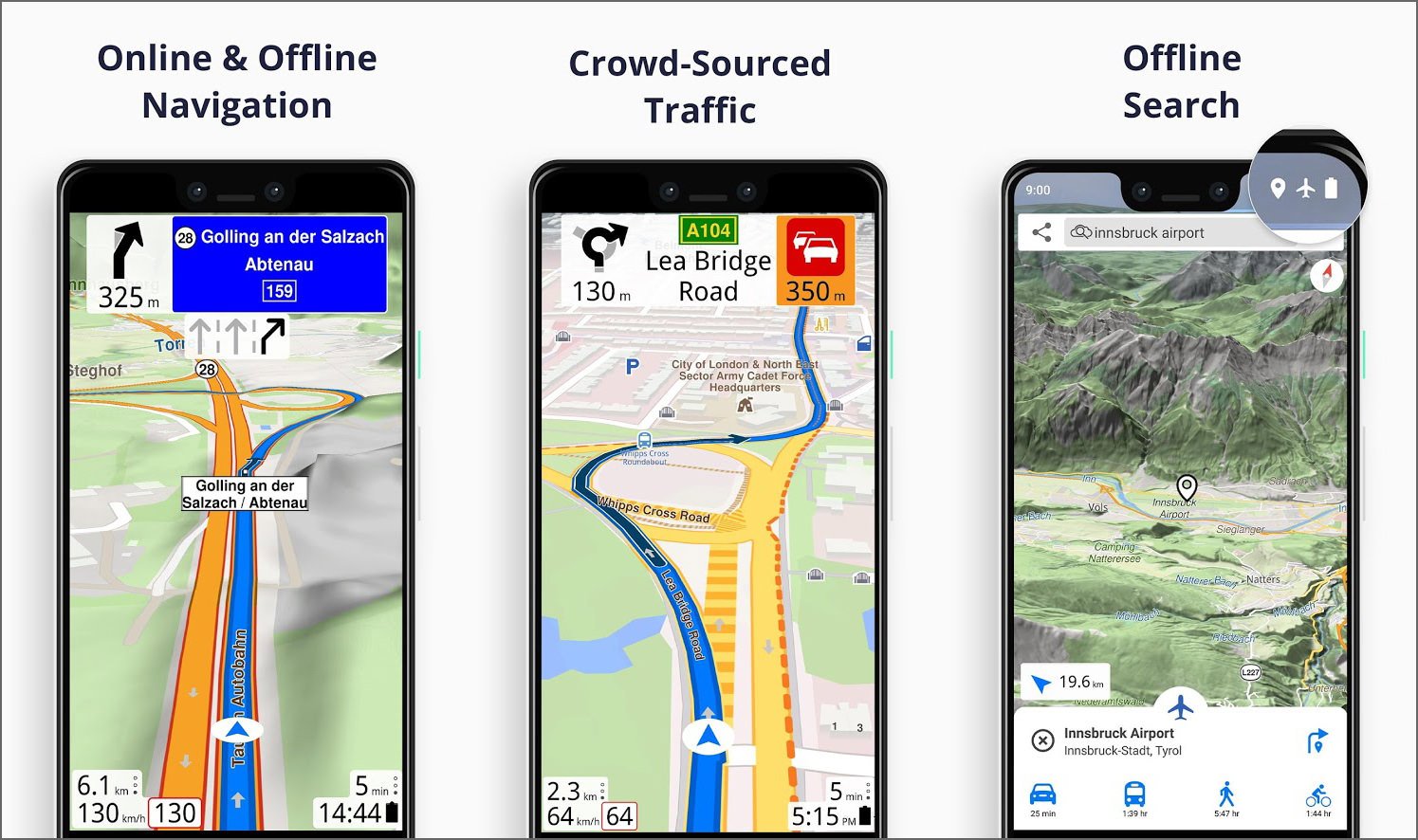
Offline Maps apps function by allowing users to download necessary data in advance. This data is stored locally on the device, enabling access even when there is no internet connection. Maps, language packs, audio files, and text content are commonly stored this way.
The amount of storage required depends on the app and the region downloaded. Larger areas and high-detail maps require more space.
GPS Without Internet
One common misconception is that GPS requires internet access. In reality, GPS works through satellites and does not depend on mobile data. Offline map apps use GPS to determine location while relying on downloaded map data to display routes and surroundings.
This makes offline navigation possible even in airplane mode.
Limitations of Offline Functionality
Offline Maps apps cannot access real-time data such as traffic updates, live reviews, or dynamic pricing. Some features may be limited until internet access is restored. Understanding these limitations helps set realistic expectations.
Despite this, offline functionality remains highly reliable for core travel needs.
Offline Maps for Navigation
Importance of Offline Maps
Offline maps are among the most critical travel tools. They help travelers navigate unfamiliar cities, rural areas, and international destinations without worrying about connectivity.
Offline Maps reduce dependency on roaming data and protect against sudden network outages.
Features of Effective Offline Maps
A good offline map includes detailed roads, landmarks, points of interest, walking paths, and address search functionality. Some also offer offline turn-by-turn navigation and saved locations.
Clear visuals and intuitive controls enhance usability when navigating under pressure.
Use Cases for Offline Maps
Offline maps are useful for city exploration, road trips, hiking trails, and emergency navigation. They are particularly valuable in regions with poor infrastructure or limited network coverage.
Travelers can rely on offline maps during border crossings, underground transit systems, and remote excursions.
Offline Navigation and Route Planning
Pre-Trip Route Planning
Many offline navigation apps allow users to plan routes in advance while connected to the internet. These routes can then be saved for offline use.
Pre-planning ensures smooth travel even when directions cannot be recalculated live.
Turn-by-Turn Directions Offline
Offline Maps turn-by-turn navigation uses stored map data and GPS signals to guide users step by step. While real-time traffic data is unavailable, basic navigation remains accurate.
This is particularly helpful for driving, cycling, and walking routes.
Alternative Route Handling
Offline Maps navigation apps may not always suggest alternative routes automatically. Users should be prepared to manually adjust routes if roads are closed or conditions change.
Understanding local signage becomes more important when offline.
Offline Translation Apps
Language Barriers During Travel
Language differences can create challenges when traveling abroad. Offline translation apps help travelers communicate, read signs, and understand menus without needing an internet connection.
These apps are especially useful in regions where English is not widely spoken.
Downloadable Language Packs
Offline Maps translation apps typically require language packs to be downloaded before travel. These packs include dictionaries, phrase databases, and sometimes voice recognition data.
Proper preparation ensures full functionality during the trip.
Practical Uses of Offline Translation
Offline translation can assist with basic conversations, emergency communication, shopping, transportation, and accommodation interactions. Even limited translations can significantly reduce stress.
Pronunciation guides and text-to-speech features add extra value.
Offline Travel Guides
Destination Information Without Internet
Offline Maps travel guide apps store information about attractions, local customs, transportation tips, and itineraries. This allows travelers to explore confidently without searching online.
Offline Maps guides are particularly helpful for cultural sites and historical landmarks.
Customizable Content
Many Offline Maps guides allow users to select specific destinations or interests, reducing storage usage and improving relevance. Travelers can tailor content to their itinerary.
Bookmarks and favorites enhance usability.
Benefits Over Online Research
Offline Maps guides eliminate the need to constantly search for information, saving time and battery life. They also provide curated content rather than scattered online results.
This makes planning and exploration more efficient.
Offline Communication Options
Messaging Without Internet
Some communication apps allow offline messaging using local networks or device-to-device connections. While functionality is limited, it can be useful in group travel situations.
Offline messaging works best when users are nearby.
Emergency Communication Tools
Offline Maps emergency apps store important contacts, medical information, and emergency procedures. These can be accessed instantly without connectivity.
This is crucial during natural disasters or unexpected situations.
Notes and Reminders
Offline note-taking apps allow travelers to write reminders, directions, and observations. These notes can be synced later when internet access is restored.
This ensures important information is never lost.
Offline Entertainment for Travel
Music and Audio Content
Offline music and podcast apps allow users to download content before travel. This is ideal for long flights, train journeys, and road trips.
Offline audio reduces boredom and improves travel comfort.
Video and Reading Content
Movies, shows, e-books, and articles can be downloaded for offline viewing. This is especially useful when internet access is restricted or expensive.
Content should be downloaded in advance to avoid interruptions.
Educational and Cultural Content
Offline educational apps provide language lessons, cultural insights, and documentaries. These enhance the travel experience and deepen understanding of destinations.
Learning on the go becomes easier without internet dependency.
Offline Utility Apps
Currency Conversion Offline
Offline currency converter apps store exchange rates for reference. While rates may not be real-time, they provide a useful approximation for budgeting and shopping.
This helps travelers avoid confusion and overspending.
Offline Calculators and Planners
Offline calculators, expense trackers, and planners assist with budgeting, scheduling, and decision-making. These tools remain functional in all conditions.
They are especially helpful for long or multi-destination trips.
Document Storage and Access
Offline document storage apps allow travelers to save passports, visas, tickets, and reservations securely on their devices. Accessing documents offline reduces reliance on printed copies.
This improves organization and peace of mind.
Preparing Your Device for Offline Travel
Downloading Content in Advance
Preparation is key for offline travel. Maps, language packs, entertainment, and documents should be downloaded before departure while connected to a stable network.
This avoids last-minute issues and incomplete downloads.
Managing Storage Space
Offline content requires sufficient storage. Travelers should remove unnecessary files and ensure enough space is available for essential data.
External storage or cloud backups can help manage space efficiently.
Battery Optimization
Offline usage generally consumes less battery than constant data access, but screen brightness, GPS, and background apps still affect battery life.
Power-saving settings and portable chargers enhance reliability.

Advantages of Using Offline Maps and Apps
Independence From Connectivity
Offline tools allow travelers to function independently of network availability. This reduces stress and increases confidence in unfamiliar environments.
Connectivity issues no longer disrupt essential tasks.
Cost Savings
Using offline apps minimizes roaming charges and reduces the need for expensive international data plans. This makes travel more affordable.
Savings can be redirected toward experiences rather than connectivity.
Improved Reliability
Offline apps are consistent and predictable. They do not depend on signal strength or network speed, making them reliable in all conditions.
This reliability is especially important in emergencies.
Limitations of Offline Travel Apps
Lack of Real-Time Updates
Offline apps cannot provide live traffic updates, current business hours, or instant reviews. Information may become outdated.
Travelers should verify critical details when possible.
Initial Setup Effort
Preparing offline apps requires time and planning. Forgetting to download necessary content can limit usefulness.
A pre-travel checklist helps avoid issues.
Storage and Device Dependence
Offline tools rely heavily on device performance and storage. Device damage or battery failure can disrupt access.
Backup plans are always recommended.
Best Practices for Offline Travel Planning
Combine Offline and Online Tools
Using offline apps alongside online tools when available provides the best balance. Offline tools handle essentials, while online access enhances flexibility.
This hybrid approach maximizes efficiency.
Regularly Update Offline Content
Updating offline data before each trip ensures accuracy. Maps, language packs, and guides should reflect recent changes.
Periodic updates improve reliability.
Test Apps Before Departure
Testing offline functionality before traveling ensures everything works as expected. This helps identify missing downloads or settings.
Confidence comes from preparation.
Future of Offline Travel Apps
Smarter Offline Capabilities
Future offline apps are expected to offer more intelligent features, including predictive routing and adaptive content based on usage patterns.
Offline experiences will become more dynamic.
Improved Storage Efficiency
Advancements in data compression will reduce storage requirements, allowing more content to be stored offline.
This benefits users with limited device space.
Deeper Integration With Devices
Offline apps will integrate more closely with operating systems, improving performance, security, and battery efficiency.
This will make offline travel tools even more seamless.
Conclusion
Offline maps and apps that work without internet have become essential companions for modern travelers. They provide navigation, communication, entertainment, and practical utilities in situations where connectivity is unreliable or unavailable.
By understanding how offline tools work and preparing devices properly, travelers can explore confidently, reduce costs, and handle unexpected challenges with ease. While offline apps have limitations, their benefits far outweigh the drawbacks when used correctly.
As travel continues to evolve, offline technology will remain a critical foundation for safe, efficient, and enjoyable journeys anywhere in the world.